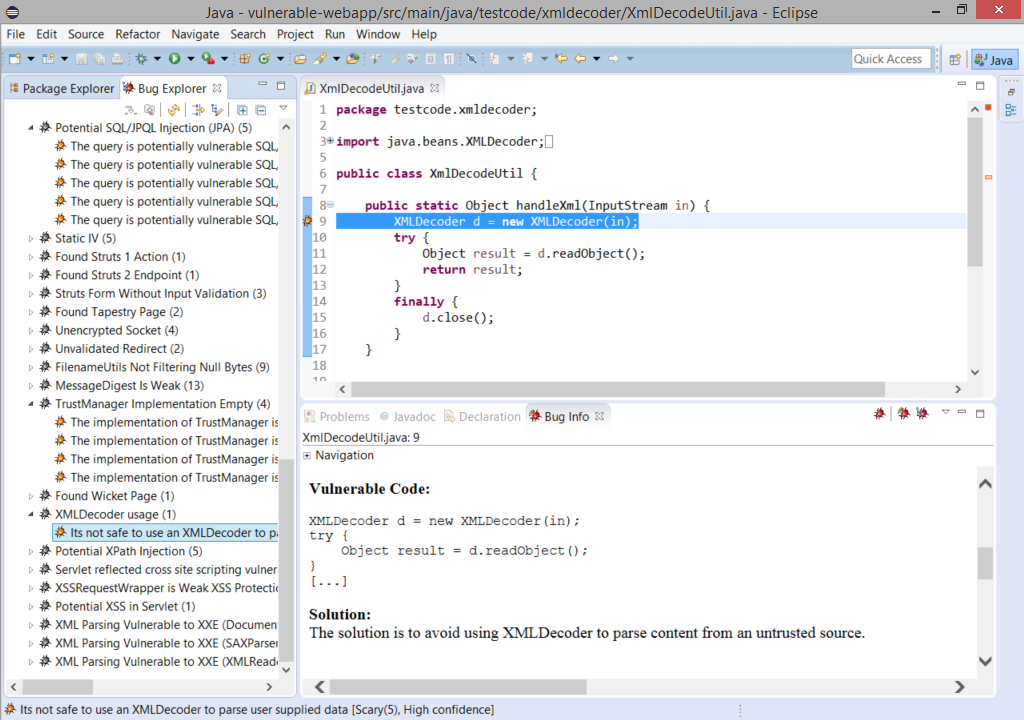
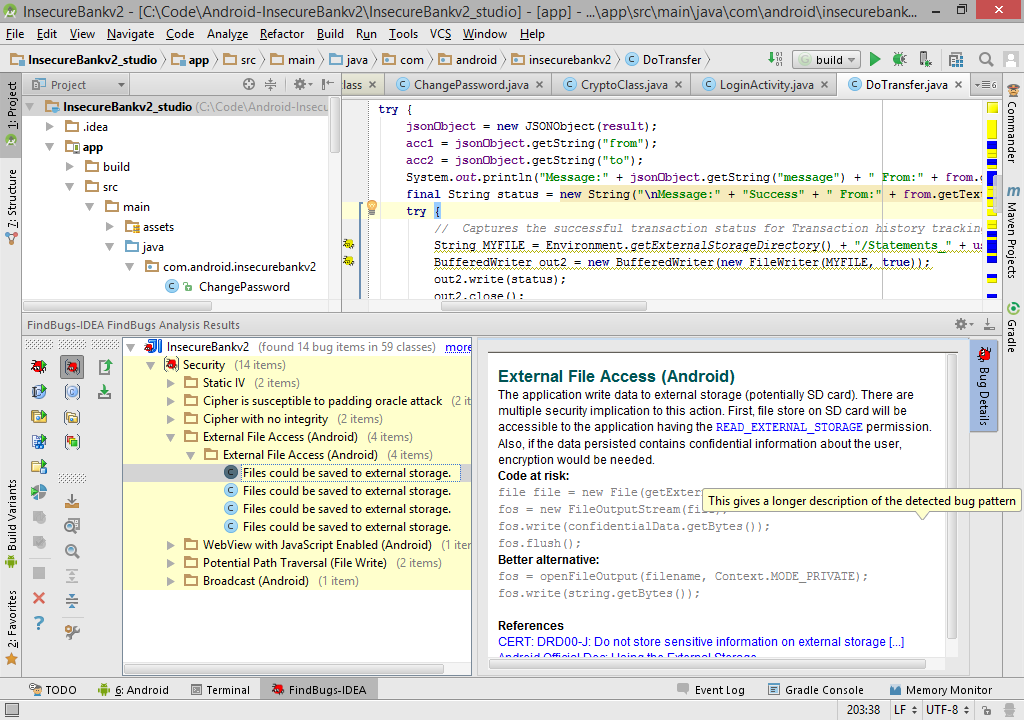
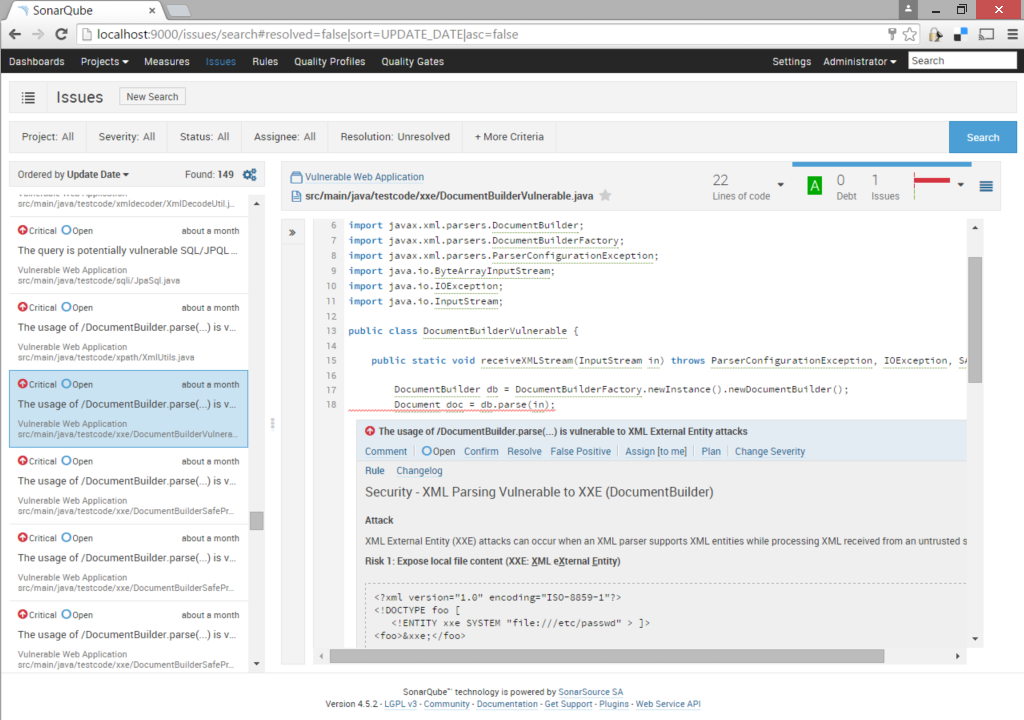
Find Security Bugs is a plugin for FindBugs that aim to help security audit on Java web application.
/download
(Latest package generated on March 3th, 2012)
Get the plugin v
1.0.1
Get Find Bugs
Eclipse Tutorial
Jenkins Tutorial (coming soon)
The bug patterns identified by the plugin are not automatically vulnerabilities or defects. They represent sensible points of the application that should be analyse closely. A description will always be attach to explain the risk.
Some vulnerability categories covered:
|
|
|
Frameworks support:
|
|
Find Security Bugs has a total of 36 detectors and 42 different bug patterns. The complete list of bug patterns are list in this section.
| Predictable Pseudo Random Generator (PRG) |
|---|
The use of a predictable random value can lead to vulnerability in those contexts:
A quick fix would be to replace the instanciation of java.util.Random by java.security.SecureRandom.
References |
| Servlet parameter |
The Servlet can read GET and POST parameters from various method. The value obtain should be consider unsafe. In may be needed to sanitize those values when calling sensitive api such as:
|
| Request Content-Type |
| The HTTP header Content-Type can be control by the client. |
| Request Hostname (ServerName/Host) |
The hostname can often be control by the client. Both GET /testpage HTTP/1.1 Host: www.example.com [...] The web container serving your application may redirect requests to your application by default. This would allow a malicious user to place any value. It is recommended to have no assumption on the value and therefor to do proper escaping and validation if needed. |
| Request Session Id |
The method
The value pass to the client is generally an alphanumeric value (ie: GET /somePage HTTP/1.1 Host: yourwebsite.com User-Agent: Mozilla/5.0 Cookie: JSESSIONID=Get ready to received any value!!??'''"e;> |
| Request Query String |
The query string is the concatenation of the GET parameters and values. Parameter others that those intended can be passed. For the url request |
| Request Header |
Request headers can easily be alter by the client. No assumption should be make that the request come from a regular browser. |
| Request Header "Referer" |
Behavior:
Recommendations:
|
| Request Header "User-Agent" |
The header "User-Agent" can be easily spoofed by the client. Adopting different behavior base on the User-Agent (for crawler UA) is not recommended. |
| Cookie usage |
The information store in the cookie should not be sensitive or related to the session. In most case, session variables should be used. see HttpSession (HttpServletRequest.getSession()) Cookies can be use for information that need live longer than the session. |
| Potential Path traversal (read file) |
A file is open to read its content. The path given is a dynamic parameter. If unfiltered parameter is pass to this file API, content from an arbitrary path could be read. This detector identify potential path transversal. In many case, the construct file path is not control by the user. If it is the case, this bug instance can be ignored.
References |
| Potential Path traversal (write file) |
The class selected is use to open a file handle using a dynamic parameter. If unfiltered input is pass to this function, content could be writen to an arbitrary path.
References |
| Command Injection |
The api highlight is used to executed system command. If unfiltered input is passed to this api, it can lead arbitrary command execution.
Reference |
| FilenameUtils partial filtering |
Some FilenameUtils' methods doesn't filter nullbyte. The risk come from the removal of characters following the NULL byte. This removal can occurs with many system API (ie. usage of the File object).
Reference |
| Weak TrustManager implementation |
Empty TrustManager implementation are often used to connected easily to a host that is not signed by a root certificate authority. As a consequence, a Man-in-the-middle attack can occurs since the client will be trusting any given certificate. A TrustManager allowing specific certificates (based on a truststore for example) should be built. Detail information for a proper implementation : [1] [2] |
| JAX-WS (JSR224) endpoint |
This method is part of a SOAP Web Service. Analysis needed
|
| JAX-RS (JSR311) endpoint |
This method is part of a REST Web Service. Analysis needed
|
| Tapestry Page |
Tapestry endpoint are discover at the application startup and are requires to be in
or the definition of an explicit annotation:
The page is mapped to the view |
| Wicket WebPage |
This class represent a Wicket WebPage. The input are read from a PageParameters instance passed to the constructor. The current page is mapped to the view [/package/WebPageName].html. |
| Weak MessageDigest |
The algorithm used is not a recommended MessageDigest. The NIST recommended to use either SHA-1, SHA-224*, SHA-256, SHA-384 or SHA-512. * SHA-224 algorithm is not provided by SUN provider.
Reference |
| Custom MessageDigest |
Implementing custom MessageDigest is error-prone. The NIST recommended to use either SHA-1, SHA-224*, SHA-256, SHA-384 or SHA-512. * SHA-224 algorithm is not provided by SUN provider. |
| Tainted filename read |
The filename given by FileUpload api can be tampered by the client. It can take value such as:
Therefore it should not be passed directly to filesystem api. If acceptable, a new filename should be picked. Otherwise, the original filename should be properly escaped. |
| ReDOS |
ReDOS stands for Regular expression Denial of Service. The regular expression (RegEx) identify may take a large amount of time when analysing certain strings.
For example the following RegEx, the input " ^(a+)+$Therefore, it is possible that a single request cause a large amount of computation on the server side.
References |
| XML parsing vulnerable to XXE attacks |
Xml External Entity attacks can occurs when the XML parsers support XML entities and received user input as XML content. Risk 1: Expose local file content (XXE : Xml eXternal Entity)
<?xml version="1.0" encoding="ISO-8859-1"?> <!DOCTYPE foo [ <!ELEMENT foo ANY > <!ENTITY xxe SYSTEM "file:///etc/passwd" > ]> <foo>&xxe;</foo>Risk 2: Denial of service (XEE : Xml Entity Expansion)
<?xml version="1.0" encoding="UTF-8" ?>
<!DOCTYPE s [
<!ENTITY x "OVERLONG_CONTENT_HERE_WITH_MORE_THAN_10^5_CHARACTERS">
]>
<foo>
&x;
&x;
[...]
</foo>
References |
| Potential XPath Injection |
XPath injection risks are simlar to SQL injection. If the XPath query contain unfilter user input, the complete datasource could be expose.
References |
| Struts 1 Action |
This class is a Struts Action. Once a request is route to this controller, a Form object will be builded that constains the HTTP parameters. |
| Struts 2 endpoint |
In struts 2, the endpoint are Plain Old Java Object (POJO) which means no Interface/Class are implements/extends. When a request is route to its controller (like the selected class). The different HTTP parameters are mapped to setter of the class. Therefor all setter of this class should be consider as input even if the form expected to be used doesn't include all of them. |
| Spring endpoint |
This class is a Spring Controller. All method annotated with |
| Potential SQL Injection |
The input values associated to the SQL queries should be escape properly. Prepare statement can be use to easily mitigate the risk (Available for all major API : JDO, JPA and Hibernate). Alternatively, typed API such as Hibernate Criteria and Querydsl can be used.
References |
| Potential LDAP Injection |
Just like SQL query, all inputs place inside LDAP query should be escape properly.
References |
| Bad hexadecimal concatenation |
When converting a byte array to a string, a conversion mistake can be made if the array is read byte by byte. The following sample illustrate the use of Integer.toHexString() which will trim the trailling "0".
MessageDigest md = MessageDigest.getInstance("SHA-1");
byte[] resultBytes = md.digest(password.getBytes("UTF-8"));
StringBuilder stringBuilder = new StringBuilder();
for(byte b :resultBytes) {
stringBuilder.append( Integer.toHexString( b & 0xFF ) );
}
return stringBuilder.toString();
This mistake can weaken the hashing function use since more collisions are introduce. In this situation, the use of toHexString() should be replace by a String.format() as follow. stringBuilder.append( String.format( "%02X", b ) ); |
| ECB mode used |
A CBC mode cipher should be used instead of ECB mode.
References |
| Hazelcast Symmetric encryption |
The network communication for Hazelcast is configure to a symmetric cipher (probably DES or blowfish). Those ciphers alone do not provide integrity or secure authentification.. The use of assymetric encryption should be privilege.
Reference |
| The use of NullCipher might be unwanted |
The NullCipher is rarelly use. It implement the Cipher interface by returning a ciphertext identical to the plaintext. In few context including testing, NullCipher can be appropriate. |
| Unencrypted socket |
The communication started will not be encrypted. The traffic could be red by an attacker intercepting the communication. Plain socket (Clear text communication): Socket soc = new Socket("www.google.com",80);
SSL Socket (Secure communication): Socket soc = SSLSocketFactory.getDefault().createSocket("www.google.com", 443);
Reference |
| DES / DESede usage |
DES and DESede (3DES), previously recommended, are not consider strong ciphers for modern applications. DESede should only be use because of hardware limitation. Currently, the NIST recommend the usage of AES block cipher.
References |
| RSA NoPadding |
The software uses the RSA algorithm but does not incorporate Optimal Asymmetric Encryption Padding (OAEP), which might weaken the encryption.
Weak example: Cipher.getInstance("RSA/NONE/NoPadding")
It should be replace by: Cipher.getInstance("RSA/ECB/OAEPWithMD5AndMGF1Padding")
Reference |
| Hard code password |
Password should not be kept in the source code. The source code are widely share in the entreprise environement. Passwords and secret keys can be managed more easily when being separated in configuration files or keystores.
References |
| Struts Form with no input validation |
Form inputs should have minimal input validation. Preventive validation can possibly mitigate unknown risk.
Validation can be introduce by implementing a
public class RegistrationForm extends ValidatorForm {
private String name;
private String email;
public ActionErrors validate(ActionMapping mapping, HttpServletRequest request) {
//Validate the properties
}
[...]
}
|
| XSSRequestWrapper is a weak XSS protection |
A implementation of The filtering is weak for few reasons:
Example of bypass <scrivbscript:pt>alert(1)</scrivbscript:pt>
The previous input will be transform to For an indepth protection, choose solution that filter characters automatically in the view (template, jsp, ...). |
| Blowfish usage with weak key size |
The Blowfish cipher supported keysize from 32 bits to 448 bits. Small key size make the the ciphertext vulnerable to brute force attack. At least 128 bits entropy should be used when generating the key. Unless the code is a legacy implementation that need maintenance, AES block cipher should be use instead.
Reference |
| RSA usage with weak key size |
"RSA Laboratories currently recommends key sizes of 1024 bits for corporate use and 2048 bits for extremely valuable keys like the root key pair used by a certifying authority". [1] The KeyPairGenerator creation should be as follow.
KeyPairGenerator keyGen = KeyPairGenerator.getInstance("RSA");
keyGen.initialize(1024);
References |
This plugin can be integrate with various development tools. It can be use within Eclipse, IntelliJ and Netbeans with their respective FindBugs plugin.
It can also be use in continuous integration such as Jenkins and Sonar.
/license
This software is release under LGPL.
Summary of the implications :
- You can use the plugin to audit any kind of project (open source and proprietary).
- If you modify the plugin, you are requires to publish the modification. If you need custom detectors for your proprietary framework, it is suggest to create a separate plugin to avoid dependency to this plugin's code.